
Get started with Novamira HQ
Novamira HQ is a desktop app. It opens in its own window, on your own machine, and everything it does starts from there: no account to create, no service to sign up for, no server of ours in between.
Install
Download the build for your platform from the Novamira HQ page. The app is self-contained: download it and open it.
- macOS: Apple Silicon and Intel builds
- Windows: x64
- Linux: x86_64
macOS and the keychain prompt
On macOS, Novamira HQ keeps your hosting credentials in the system keychain, in an item called “Novamira HQ”. When the app needs to read them, macOS shows its own security dialog:
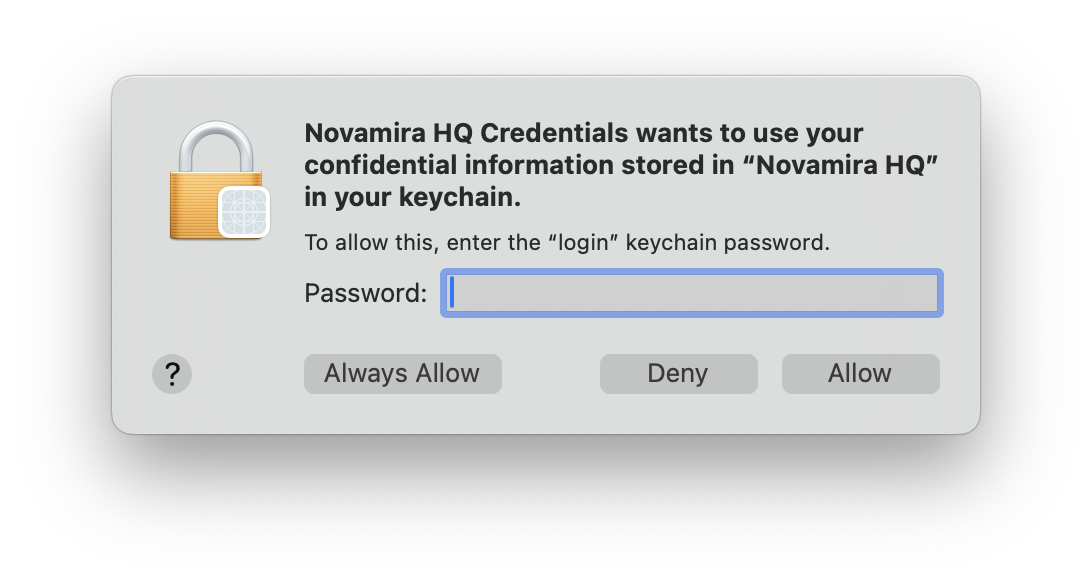
That dialog is macOS guarding the credential, not an extra Novamira login. Enter the password of your Mac user account (the “login” keychain password) and choose Always Allow, so the app can read the credential without asking every time. Deny blocks Novamira HQ from reading it, and hosting features stop working until you allow it.
First steps
- Add your sites. Connect a hosting account, or add a single site directly. See Add your sites.
- Connect your AI, once. The guided setup configures your AI client against Novamira HQ. See Connect your AI.
From then on, every site in the app is available to your AI, and a site you add later is simply there.